

Navigating cybersecurity in 2026 isn’t about setting up a simple password and hoping for the best. Digital threats are faster, quieter, and more sophisticated than ever. Having the right tools isn’t just a precaution—it’s what keeps your identity, sensitive files, and business assets safe.
Whether you’re trying to keep a single family computer clean, shield a remote team, or map out an entire company network, having the right protection stack makes all the difference.
1. Bitdefender Total Security: Serious Protection That Doesn’t Drag Down Your PC
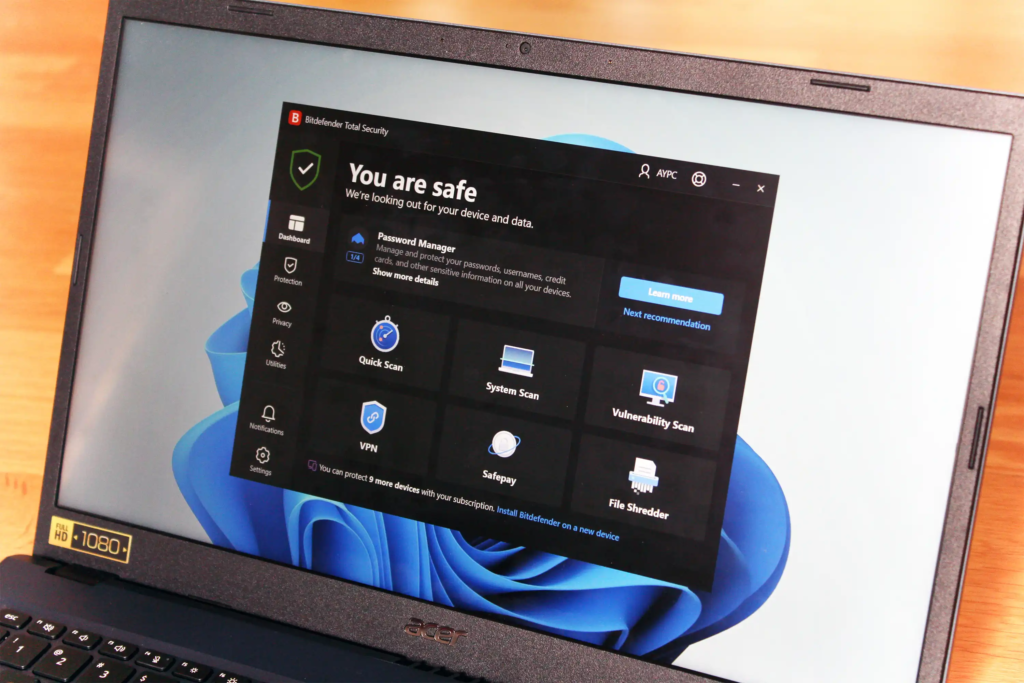
If you want comprehensive security for your personal devices without dealing with a lagging system, Bitdefender Total Security remains a top choice. It handles heavy-duty threat monitoring quietly in the background so you can work, stream, or game without your fans screaming.
What makes Bitdefender great for daily use is how seamlessly it runs. Its multi-layered ransomware protection keeps your personal files safe from unauthorized locking, while its smart background scanners catch threats long before they can do any damage.
- Smart behavior-based scanning: Tracks how applications act in real time, stopping brand-new zero-day threats instantly even if they haven’t been cataloged yet.
- Ultra-light system footprint: Designed to use minimal memory and processor power so your laptop stays fast and your battery lasts.
- All-in-one safety suite: Comes packed with a built-in Virtual Private Network (VPN) for public Wi-Fi safety and a reliable password manager to secure your logins.
2. Malwarebytes: Quick Cleanup and Scam Defense When Things Go Wrong

Malwarebytes is a trusted security tool that helps detect and remove malware, block suspicious threats, and provide scam protection when your device or accounts are at risk.
Malwarebytes offers fast malware detection, threat removal, and scam protection, making it a useful choice for quickly securing your device when something goes wrong.
It is particularly useful for stopping aggressive adware, fake browser updates, and clever phishing traps that target everyday users across PC, Mac, and mobile platforms.
If your computer is acting up, popping open random tabs, or you suspect you clicked on something shady, Malwarebytes is your emergency response kit. While standard antivirus tools focus on keeping bad code out, Malwarebytes is famous for going in and hunting down stubborn infections that managed to slip past front-line defenses.
It is particularly useful for stopping aggressive adware, fake browser updates, and clever phishing traps that target everyday users across PC, Mac, and mobile platforms.
- Fast and thorough remediation: Swiftly scans your storage and system memory to find, isolate, and wipe out complex malware in minutes.
- Adware and PUP removal: Strips out annoying Potentially Unwanted Programs (PUPs), rogue extensions, and hijacked search engines that clutter your screen.
- Flexible cross-device defense: Gives you an easy, identical cleanup experience whether you’re fixing a desktop, a MacBook, or a smartphone.
3. Norton 360: All-Around Digital Defense with Cloud Backups Built In
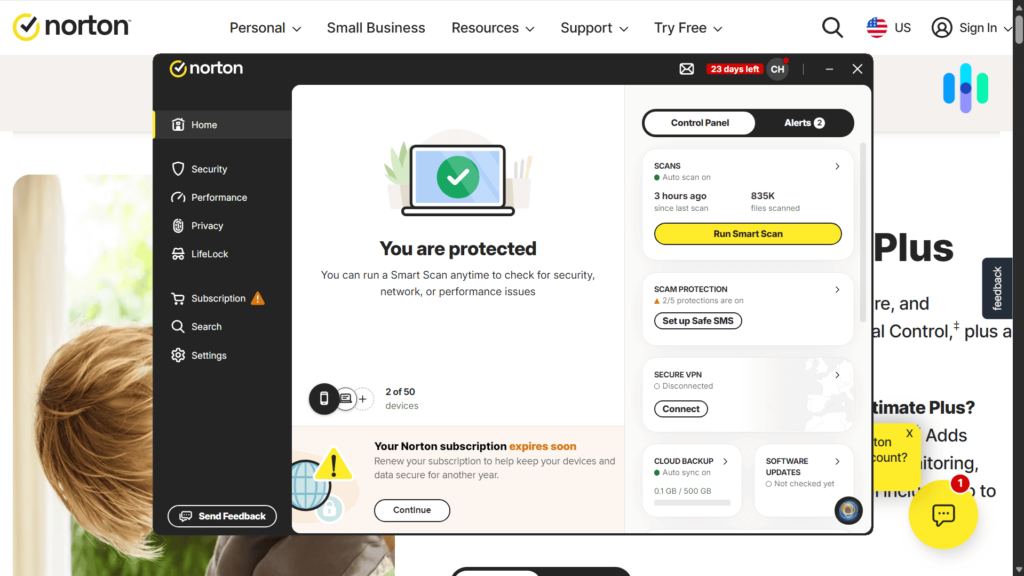
For people who prefer an all-inclusive security package that guards both their physical hardware and online identity, Norton 360 offers a powerful feature set. It treats your digital safety as a complete picture, pairing core antivirus scanning with identity monitoring and automated recovery options.
One of Norton’s biggest highlights is its automated cloud backup storage, giving you an off-site safety copy of your essential documents, family photos, and financial files in case your computer breaks or gets hit by ransomware.
- Automated cloud backups: Keeps your important files continuously synced to secure online storage, neutralizing the threat of unexpected hardware crashes.
- Dark web identity alerts: Keeps an eye on dark web forums for your email addresses, passwords, and sensitive information, alerting you the moment a leak happens.
- Intelligent host firewall: Monitors incoming and outgoing internet traffic on your device, blocking shady connection attempts from outside hackers automatically.
4. CrowdStrike Falcon: Next-Level Cloud Protection for Business Endpoints
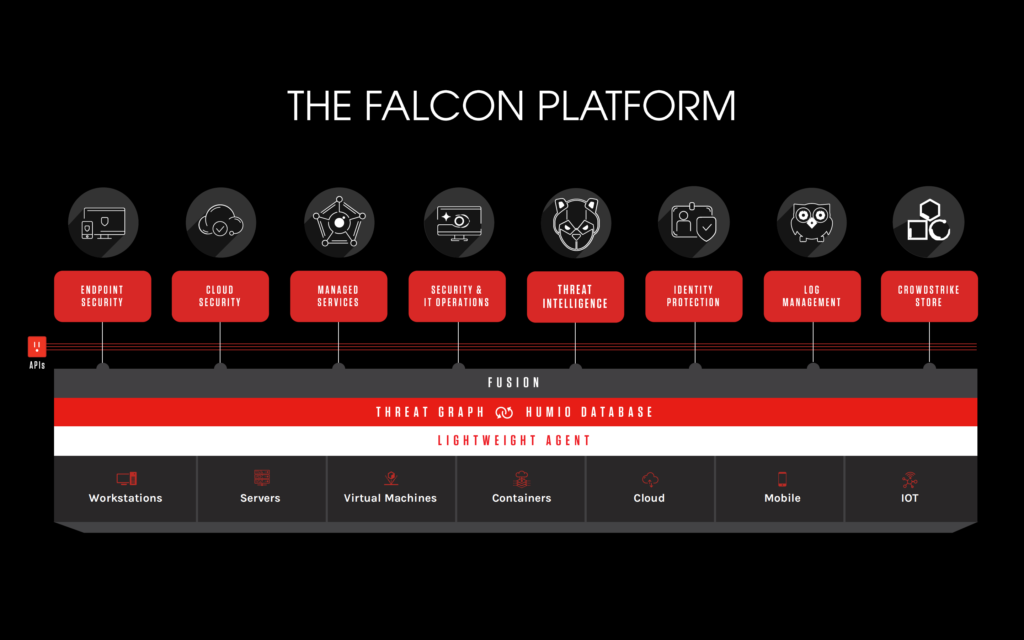
When it comes to business setups, standard consumer antivirus software just doesn’t cut it. CrowdStrike Falcon is widely recognized as a premier choice for business endpoint security, using cloud power and artificial intelligence to prevent corporate breaches in real time.
Instead of relying on old-school virus signature lists, CrowdStrike uses cloud-driven machine learning to watch behavior patterns across all your company laptops, servers, and remote setups at once.
- AI behavioral detection: Spots malicious behavior patterns as they happen, stopping sophisticated attacks like fileless malware right in their tracks.
- Lightweight cloud agent: Eliminates the need for heavy local servers, letting your IT team secure remote and office workers through a single lightweight agent.
- Real-time threat intelligence: Continuously learns from global security data, shielding your workforce from brand-new vulnerabilities as soon as they emerge.
5. SentinelOne Singularity: Smart, Autonomous Defense That Can Roll Back Attacks

In corporate environments, speed is everything. SentinelOne Singularity focuses on stopping attacks instantly by placing fully autonomous AI directly onto every company device. This means even if an employee’s laptop disconnects from the internet, the software still catches and neutralizes threats locally without waiting for human approval.
One of SentinelOne’s standout features is its single-click threat rollback. If a dangerous script somehow sneaks in and alters files, the system can automatically reverse the damage and restore compromised files to their clean states within seconds.
- Autonomous offline intelligence: Analyzes and blocks threats directly on the local device, keeping endpoints secure even without an active internet connection.
- Instant threat rollback: Restores modified files and system settings to their pre-infection state using shadow snapshots, taking the teeth out of ransomware.
- Unified network visibility: Gives your IT team a single visual dashboard to monitor laptops, remote servers, cloud workloads, and connected office devices.
6. ESET Small Business Security: Hassle-Free Protection Built for Growing Teams
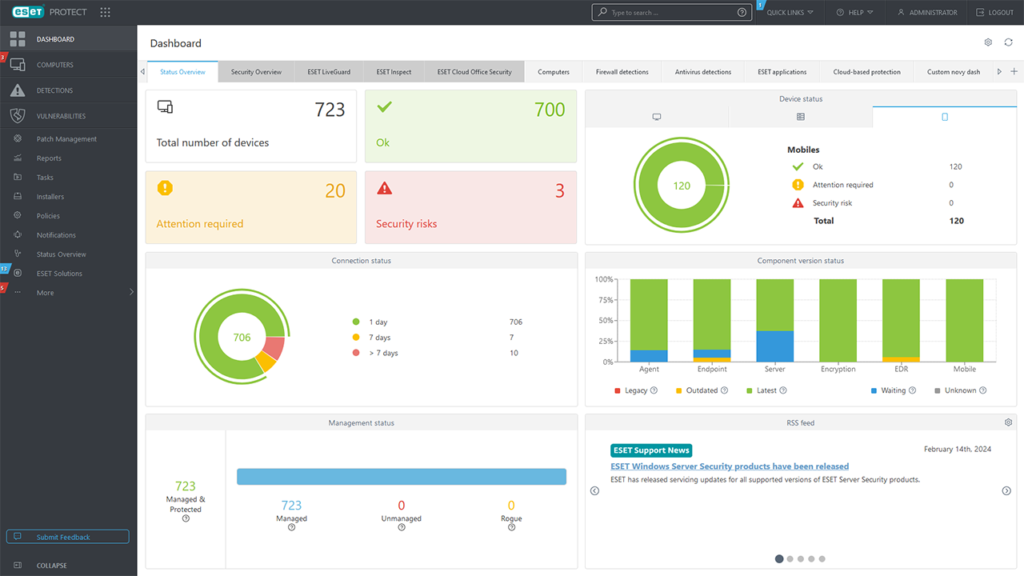
Not every business has a huge budget or a dedicated 24/7 IT team. ESET Small Business Security is built specifically for growing businesses that need robust enterprise safety squeezed into an intuitive package that easily covers up to 25 devices.
ESET pairs powerful background security with practical business features—like encrypted web browsers for online banking, network checks, and data protection to keep customer details safe.
- Simple multi-device management: Lets you manage phones, laptops, desktops, and office servers through one straightforward, web-based control panel.
- Protected online banking: Automatically secures browser sessions and encrypts keystrokes to keep your company’s financial accounts and credit cards safe from loggers.
- Phishing and botnet protection: Keeps your employees out of fake email traps and prevents your office devices from being secretly hijacked into attack networks.
7. Nmap: The Must-Have Tool for Network Mapping and System Audits
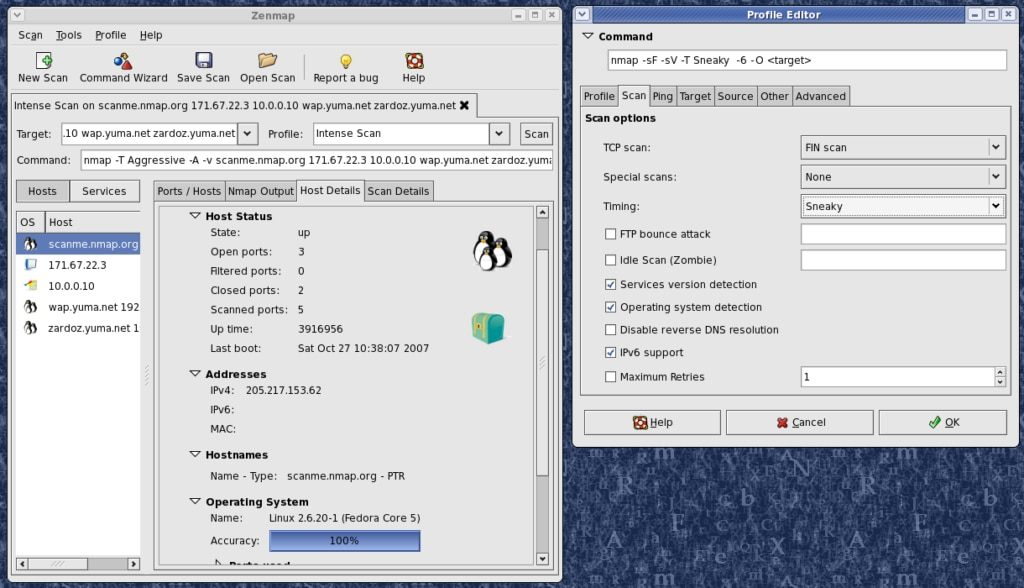
When you need to see what is actually happening across your network, open-source utilities are the gold standard. Nmap (Network Mapper) is a free tool used daily by sysadmins, security analysts, and tech enthusiasts to map connected hardware and audit open ports.
By sending custom data packets across your local network or remote servers, Nmap acts like a digital sonar system. It reveals precisely what devices are online, what operating systems they run, and which network ports are vulnerable to outside access.
- Instant device discovery: Scans your network IP range to quickly generate a list of every active laptop, server, smart TV, and router connected to your system.
- Port and service auditing: Shows you exactly which software services are listening on open network ports so you can close down risky openings.
- Hardware and OS detection: Reads subtle packet responses to figure out the exact operating system and software version running on target machines.
8. Wireshark: Inspect Network Traffic Down to the Data Packet
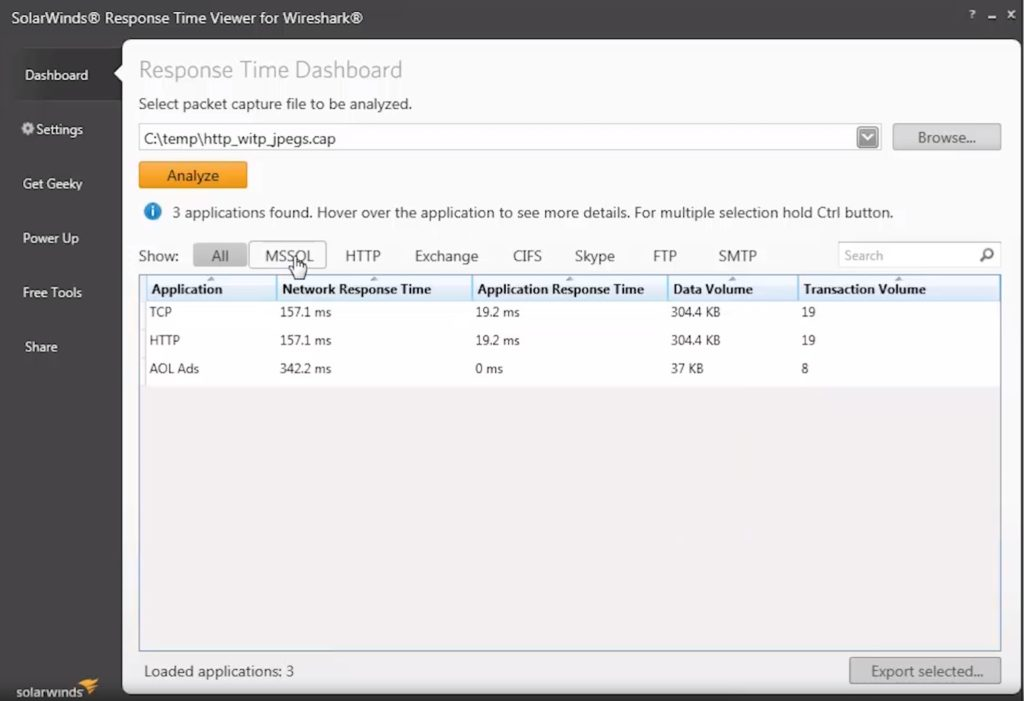
Where Nmap helps you map out devices on your network, Wireshark lets you look directly inside the data moving back and forth between them. It is the world’s leading open-source packet analyzer, letting you capture and inspect live network traffic down to individual data structures.
Wireshark is invaluable when you’re trying to figure out why a network is running slow, track down suspicious background data transfers, verify if your traffic is properly encrypted, or run detailed analysis after a security bug pops up.
- Live network packet capture: Intercepts live data streams moving over Wi-Fi or Ethernet cables, logging them for real-time or later analysis.
- Deep protocol inspection: Decodes hundreds of different communication protocols, turning messy raw data into neat, readable structural views.
- Precision filtering tools: Uses simple search filters so you can pinpoint suspect IP addresses, weird traffic spikes, or bad data transfers out of gigabytes of logs.
9. Finding Your Fit: Next Steps for Securing Your Setup

Building a secure environment comes down to picking tools that fit your actual daily setup. If you’re protecting personal laptops or family devices, easy-to-run software like Bitdefender, Malwarebytes, or Norton 360 gives you great protection without complex setups. If you’re managing a growing team or company infrastructure, solutions like CrowdStrike Falcon, SentinelOne Singularity, or ESET offer the centralized control and automatic threat isolation you need.
If you want to dive deeper into specs, evaluations, and enterprise details:
- Read up on recent threat reports and endpoint updates directly via SentinelOne.
- Check out real-world lab tests and software side-by-sides on PCMag.
- Compare feature breakdowns and pricing structures using Security.org.

Tool Deals & Offers 2026: Discover Top Tools at Better Prices
Digital tools have become an important part of everyday work. Tool Deals & Offers Whether…
Free vs. Paid Tools 2026: Which Tools Are Worth It?
From productivity apps and design software to AI platforms, writing Free vs. Paid Tools assistants,…
Best Tool Deals 2026: Software Discounts & Special Offers
Software has become a daily necessity for work, study, business, Tool Deals content creation, design,…

SaaS Deals 2026: Best Software Discounts, Offers & Lifetime Deals
Running a business, managing client projects, or creating SaaS Deals content in 2026 relies heavily…

Best Tool Tips & Hacks in 2026 to Work Smarter
Let’s be honest: most of us spend Best Tool Tips our workdays performing digital acrobatics…
Stop Paying: 15 Free Tools You Should Try in 2026
Before we dive into the deep details, here is the cheat sheet. This is Free…